Organizational network analysis
See how work actually flows through your organization
Organizational network analysis (ONA) maps the informal relationships people rely on to get work done — who asks whom for advice, who is trusted, whose opinion carries weight. A network survey asks every employee to name the colleagues they actually work with, then turns those answers into a map of the organization as it really operates.
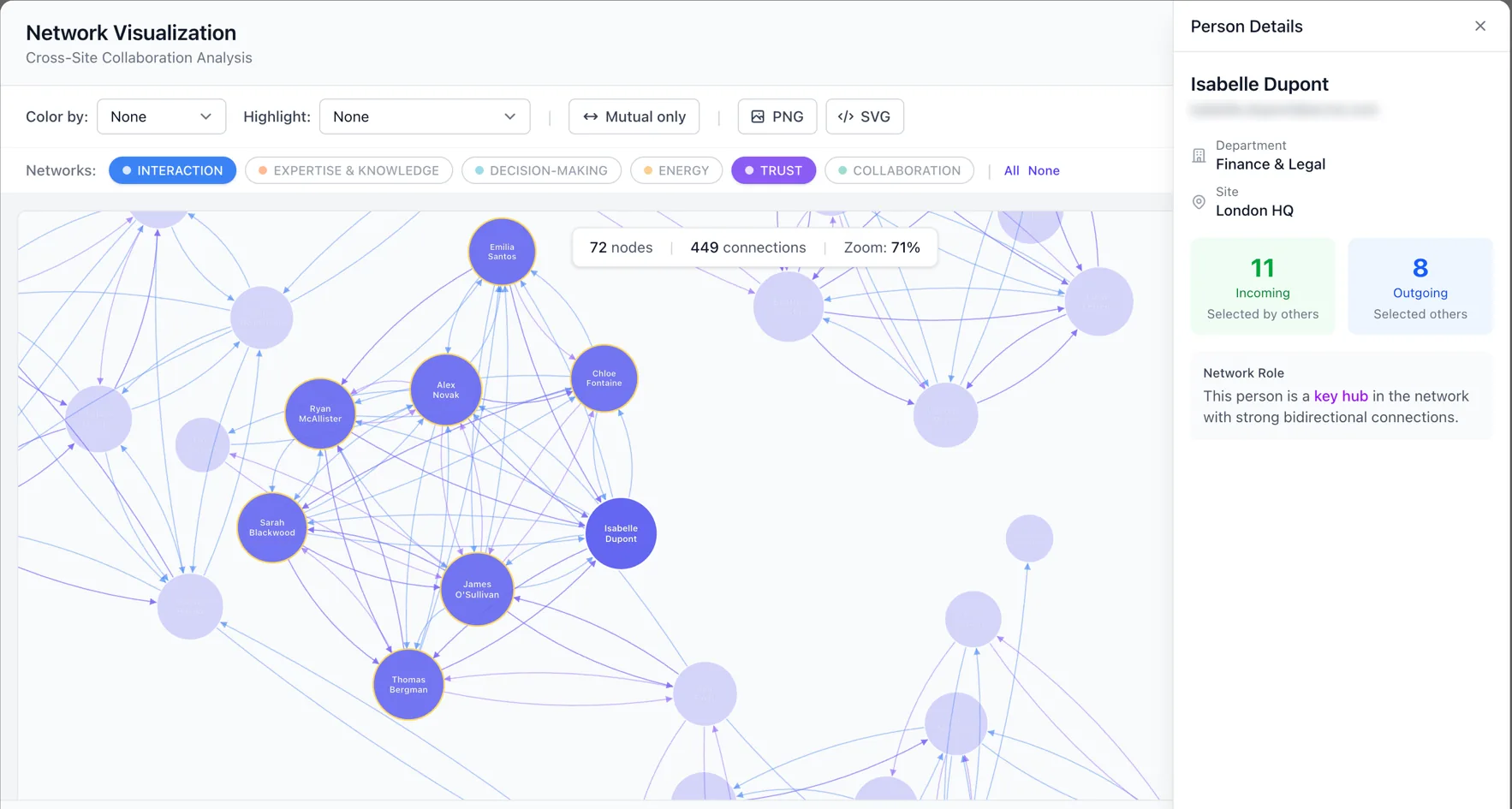
What a network survey shows you
Every employee names the colleagues they rely on. Those answers combine into four things an org chart cannot tell you.
- Key connectors
- The people colleagues name most often. Often they hold no senior title, and losing one of them costs far more than the org chart suggests.
- Bottlenecks
- People so many others depend on that work queues behind them. A bottleneck is usually a capable person who has quietly become a single point of failure.
- Isolated people and groups
- Employees nobody named, and teams with no links to the rest of the organization. New joiners and remote teams show up here first.
- Network density
- How connected the organization is overall, and how that differs by division, site or tenure once you filter the dashboard.
Ranked by in-degree and out-degree
High in-degree, low out-degree
Zero or near-zero connections
Connections vs. possible connections
Seven kinds of network, measured separately
Who you ask for advice is not who you trust, and neither is who you socialize with. Spherica ships 45 template questions across seven standard network types, so you can measure each relationship on its own instead of collapsing them into one score.
Interaction
Who you work with day to day, and who depends on you to finish their work.
7 template questions
Collaboration
Who you actively work alongside on shared tasks and projects.
6 template questions
Expertise
Who people go to for knowledge and technical judgement.
6 template questions
Decision-making
Whose input shapes decisions, formally or otherwise.
6 template questions
Energy
Who leaves people more motivated after working with them, and who drains them.
6 template questions
Change
Who people listen to when there is uncertainty or resistance to change.
7 template questions
Affinity
Who people trust with sensitive issues and consider a close working relationship.
7 template questions
Your own
Define custom network types with your own questions when the standard set does not describe the relationship you need to measure.
The questions people actually answer
Network survey questions ask employees to name colleagues, not to rate statements. These are real templates from the library.
- “Who do you go to when you have questions or doubts about your work?”
- “Who plays an important role in shaping direction, even without formal authority?”
- “Who do you trust with sensitive or delicate work-related issues?”
Each employee selects up to five colleagues per question.
How it works
- 01
Choose your networks
Start from 45 template questions across seven network types, or write your own. Each network you add is a separate set of questions employees answer.
- 02
Send it to everyone
Employees receive a secure link by email and name up to five colleagues per question. There are no passwords and no accounts to create.
- 03
Read the map
An interactive dashboard ranks connectors, surfaces bottlenecks and isolated people, and filters by division, area, site or tag. Generate a PDF report with an AI-written executive summary in one click.
Questions people ask about network surveys
- What is organizational network analysis?
- Organizational network analysis (ONA) maps the informal relationships people rely on to get work done: who asks whom for advice, who is trusted, whose opinion carries weight. It describes the organization as it actually operates, which is usually not the organization drawn on the org chart.
- How is a network survey different from an engagement survey?
- An engagement survey measures how people feel, one person at a time. A network survey measures how people are connected. Instead of rating statements, each employee names the colleagues they actually go to, and those answers combine into a map of information flow and influence.
- Are network survey responses anonymous?
- No, and they cannot be. A network survey works by asking people to name colleagues, so identity is required to connect the answers into a map. If you need anonymity, run a company survey instead, which supports fully anonymous responses.
- Can we define our own network types?
- Yes. Spherica ships 45 template questions across seven standard network types, and you can add custom network types with your own questions when the standard set does not describe the relationship you want to measure.
- What do you get at the end of a network survey?
- An interactive dashboard with demographic filters, plus a generated PDF report containing an executive summary and written insights. The dashboard ranks key connectors, surfaces bottlenecks and isolated people, and reports overall network density.
- Why not just use the org chart?
- An org chart shows reporting lines, which say who is accountable to whom. It does not show who people actually ask for help, whose approval matters informally, or which teams never talk to each other. Those patterns are what a network survey measures.
Map your organization as it really works
Run a network survey on your own data, or open the demo dashboard and look at a finished one first.